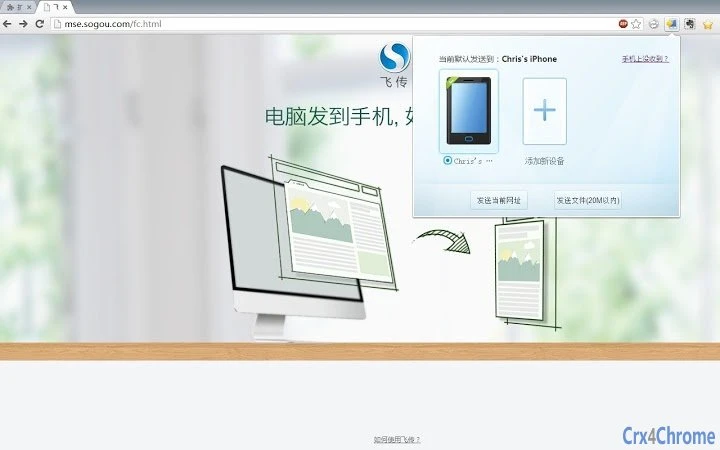

Send Files to Phone in Seconds
Is the software compatible with both Windows and Mac?
The software supports both Windows and Mac operating systems, making it accessible across major desktop platforms.
Is the software safe to use without registration?
Yes, the software operates without requiring any account or login, minimizing data exposure risks.
How often are updates released?
Regular updates are provided to ensure compatibility and functionality, though specific update frequency was not disclosed.
What type of license does the software use?
The software is distributed as free software, with no cost associated with its use or distribution.
Can I use the software offline?
Yes, the software functions without requiring an internet connection after initial setup, allowing for secure local transfers.
Overview
飞传 is a desktop application designed to simplify the process of transferring digital content between computers and mobile devices. Its primary function is to enable users to send web pages, links, images, and files from their desktop to their smartphone with minimal effort. The software is built around a no-account model, eliminating the need for registration, login, or account management—ideal for users who prioritize privacy and speed.
It is particularly useful in collaborative environments where quick sharing among team members or friends is needed. The software supports multiple mobile devices per computer, allowing a single desktop to serve as a shared transfer hub. While the developer’s background is not publicly detailed, the product’s focus on simplicity and cross-device functionality suggests a targeted approach to solving common productivity bottlenecks.
Real-world use cases include sharing research links during meetings, sending photos from a work computer to a mobile device, or enabling quick file handoffs in informal group settings.
Key Features & Capabilities
- Zero-Registration Setup – No account, login, or personal data required. Users can start sharing immediately after scanning a QR code.
- Multi-Device Binding – A single computer can be linked to multiple smartphones, enabling shared access among friends or team members.
- One-Tap Sharing – Once bound, users can send content such as URLs, images, and files with a single click.
- QR Code-Based Pairing – The connection between desktop and mobile is established via QR code scanning, ensuring a secure and fast setup process.
- Universal Content Transfer – Supports a broad range of file types and web-based content, making it versatile across personal and professional workflows.
The software streamlines workflows where fast content transfer is essential. For example, a user can copy a link from a browser, click the fly transfer icon, and instantly send it to a colleague’s phone. Similarly, a designer might send a high-resolution image directly from their desktop to a mobile device for on-the-go review. The QR code pairing method reduces friction compared to traditional cloud-based tools that require account creation. The ability to bind multiple devices also makes it ideal for shared workspaces or casual gatherings where multiple people need to send content without creating individual accounts.
User Interface, Workflow & Performance
The user interface is designed with minimalism in mind, focusing on core functionality without clutter. Navigation is straightforward, with a central icon or menu item that triggers the sharing process. Users are prompted to scan a QR code displayed on the screen to initiate device pairing.
Once linked, the workflow becomes highly efficient—select content, click a button, and the transfer begins. The software integrates seamlessly with the desktop environment, operating in the background with minimal interruption. Performance details were not specified by the developer, but the lightweight nature of the application (10.2 MB) suggests low resource consumption.
The developer did not provide additional system requirements or performance benchmarks. Stability is expected to be consistent given the limited scope of functionality, though real-world reliability may vary depending on network conditions and device compatibility. No known issues were reported in the release notes.
Compatibility & System Requirements
飞传 is compatible with both Windows and Mac operating systems, supporting a broad range of desktop environments. The software version is 1.0.0, with an installation size of 10.2 MB, indicating a lightweight footprint. The developer did not specify exact system requirements, such as minimum CPU, RAM, or disk space.
Compatibility information was partially provided, leaving some aspects of hardware compatibility unconfirmed. Users are advised to ensure their operating system is up to date to avoid potential issues. The software does not appear to require administrative privileges for installation, based on standard practices for similar tools.
No third-party dependencies were mentioned in the release details.
Pros and Cons
Pros
- Zero registration required—ideal for privacy-conscious users
- Simple one-click sharing across devices
- Supports multiple mobile devices per computer
- Lightweight application with minimal system impact
- QR code pairing ensures fast and secure setup
Cons
- No detailed system requirements provided
- Performance metrics were not disclosed
- Developer background is not publicly available
- Functionality is limited to basic file and content transfer
- Exact update frequency is unknown
Final Thoughts + CTA
飞传 delivers a refreshingly simple solution to a common digital workflow challenge: moving content from desktop to mobile. By eliminating registration and leveraging QR code pairing, it removes friction and enhances privacy. Its ability to bind multiple devices makes it uniquely suited for collaborative or social use cases.
While some technical details are missing, the software’s lightweight design and intuitive interface suggest reliable performance for everyday tasks. For users seeking a fast, secure, and no-strings-attached way to share files, links, and images between devices, fly transfer is a compelling choice. The free pricing model further enhances its appeal.
Download 飞传 now.







